Choosing the right amount of RAM is important for a smooth gaming experience in 2026. Whether you play casual mobile games, competitive PC titles, or demanding AAA games, having enough memory can help reduce stuttering, improve multitasking, and keep your system running smoothly.
However, more RAM does not always mean better gaming performance. The ideal amount depends on the games you play, your computer’s specifications, and whether you run other applications while gaming.
In this guide, we will explain how much RAM you need for gaming in 2026 and how to choose the right amount for your budget.
What Is RAM and Why Does It Matter for Gaming?
RAM stands for Random Access Memory. It temporarily stores the data your computer needs to access quickly while running games and applications.
When you launch a game, your system uses RAM to handle game assets, textures, maps, character models, and other information. If your computer does not have enough memory, it may rely more heavily on your storage drive, which can contribute to stuttering and slower loading in some situations.
Having sufficient RAM helps your system manage games and background applications more efficiently. However, gaming performance also depends on your processor, graphics card, storage, and game optimization.
How Much RAM Do You Need for Gaming in 2026?
The amount of RAM you need depends on your gaming habits and performance expectations.
| RAM Capacity | Best For | Recommendation |
|---|---|---|
| 8GB | Older games and basic gaming | Limited for modern PC gaming |
| 16GB | Most mainstream gaming | Good starting point |
| 32GB | Modern AAA games and multitasking | Recommended for many gaming PCs |
| 64GB | Heavy multitasking, content creation, and specialized workloads | Unnecessary for most gaming-only setups |
For many PC gamers in 2026, 16GB is a practical starting point, while 32GB is a more comfortable choice for a new gaming PC. Your actual requirements may vary depending on the specific game and other software running in the background.
Is 8GB RAM Enough for Gaming?
Eight gigabytes of RAM can still run some older games, lightweight titles, and certain esports games. However, it can be restrictive when playing newer PC games or running several applications simultaneously.
With only 8GB of memory, you may experience:
- Stuttering during demanding gameplay.
- Performance issues when switching between applications.
- Limited room for background programs.
- Difficulty meeting the minimum requirements of some modern games.
If your computer currently has 8GB of RAM, upgrading to 16GB may improve overall responsiveness and reduce memory-related performance problems.
Before upgrading, check your motherboard or laptop specifications to confirm the supported RAM capacity and configuration.
Is 16GB RAM Enough for Gaming in 2026?
For many gamers, 16GB of RAM remains a reasonable option. It can provide a good experience in numerous popular games when paired with a suitable processor and graphics card.
Sixteen gigabytes may be sufficient if you mainly play competitive shooters, sports games, racing games, indie titles, and other moderately demanding games.
It can also work well if you typically close unnecessary background applications before starting a game.
However, some demanding games, heavily modded titles, and gaming setups that include streaming or recording may benefit from additional memory.
If you already have 16GB installed, you do not necessarily need to upgrade immediately. Check your actual memory usage and whether you experience performance issues before spending money on more RAM.
Is 32GB RAM Better for Gaming?
For a new gaming PC in 2026, 32GB is an excellent capacity to consider.
It provides more memory headroom for modern games, background applications, web browsers, voice chat, and game launchers. It can also be useful for players who enjoy installing large game modifications or running multiple applications while gaming.
The main advantages of 32GB RAM include:
- More room for demanding games and background tasks.
- Better flexibility for multitasking.
- Additional capacity for large game modifications.
- A more comfortable setup for gaming alongside recording or streaming.
Keep in mind that upgrading from 16GB to 32GB will not automatically increase your FPS in every game. If a game already runs comfortably within 16GB, the difference may be small or unnoticeable.
Do You Need 64GB RAM for Gaming?
Most gamers do not need 64GB of RAM for gaming alone.
This capacity is more useful for people who combine gaming with demanding creative or professional workloads, such as video editing, 3D rendering, virtual machines, or specialized simulation software.
Some heavily modded games and complex workloads can also use substantial memory, but requirements vary significantly.
If your primary goal is to play games, investing in 32GB RAM and allocating the remaining budget toward a better graphics card, processor, or SSD may provide greater overall value.
How Much RAM Do Popular Types of Games Need?
Different game genres place different demands on system memory. The following recommendations are general starting points, not guaranteed minimum or official requirements for every title.
| Game Type | Suggested RAM |
|---|---|
| Lightweight and indie games | 8GB–16GB |
| Competitive esports games | 16GB |
| Sports and racing games | 16GB–32GB |
| Open-world games | 16GB–32GB |
| Modern AAA games | 16GB–32GB |
| Heavily modded games | 32GB or more, depending on mods |
| Gaming while streaming | 32GB is a sensible starting point |
Always check the official system requirements for the specific game you want to play. Some titles may require more memory, while others can run well with less.
Does RAM Increase FPS in Games?
RAM can affect FPS, but the result depends on your current hardware and whether memory is limiting performance.
If your system has insufficient RAM, upgrading may reduce stuttering and improve frame-time consistency. In some situations, it can also improve average frame rates.
However, adding more memory will not necessarily increase FPS if your computer is limited by its graphics card or processor.
For example, upgrading from 8GB to 16GB may make a noticeable difference when a game is running out of memory. On the other hand, upgrading from 32GB to 64GB may produce little or no improvement in a typical gaming workload.
To improve gaming performance, consider your entire system rather than focusing on RAM capacity alone.
Is RAM Speed Important for Gaming?
Yes, RAM speed can influence gaming performance, especially in systems where the processor benefits from faster memory.
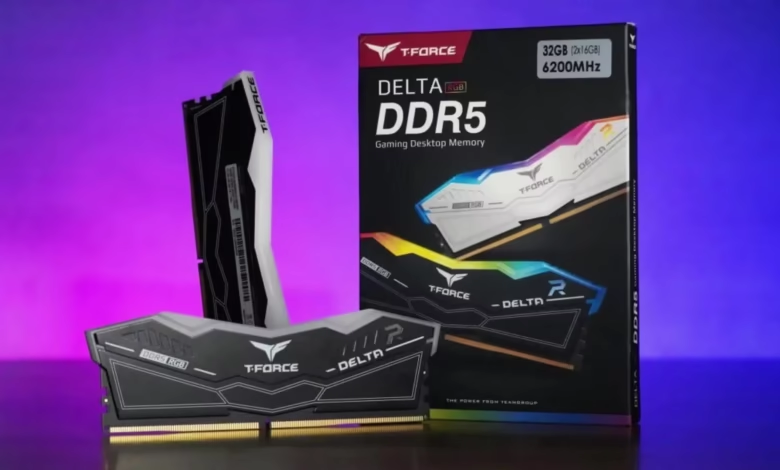
For modern DDR4 systems, many gaming PCs use memory kits around the DDR4-3200 range. Modern DDR5 systems commonly use faster kits, with DDR5-5600 or DDR5-6000 being examples of configurations worth considering when compatible with the platform.
These are general examples rather than universal requirements. The best speed depends on your processor, motherboard, memory compatibility, and budget.
You should also consider memory timings and whether your system supports the advertised speed. Enabling a supported memory profile in the BIOS may be necessary to run a kit at its rated speed.
Do not purchase faster RAM without checking compatibility with your existing system.
Should You Choose One RAM Stick or Two?
For many desktop gaming PCs, using two compatible RAM sticks can provide dual-channel memory operation, which can improve memory bandwidth compared with a single stick.
For example, a 32GB configuration made from two 16GB modules is a common choice for gaming desktops.
However, the ideal configuration depends on your motherboard, processor, and upgrade plans. Laptop memory arrangements and systems with soldered memory may have different limitations.
Before buying RAM, check your motherboard or laptop manual for recommended slots, supported capacities, and compatible memory types.
How to Check Your RAM Usage While Gaming
If you are unsure whether you need more RAM, check how much memory your system actually uses.
On Windows 10 or Windows 11:
- Press Ctrl + Shift + Esc to open Task Manager.
- Select the Performance tab.
- Click Memory to view your installed RAM and current usage.
- Start your usual game and play for a few minutes.
- Check memory usage again, including background applications.
If memory usage regularly approaches the available capacity and you experience stuttering or slowdowns, an upgrade may help. High memory usage alone does not prove that RAM is the cause of a performance problem, so check CPU, GPU, and storage usage as well.
Tips for Choosing the Right RAM for Your Gaming PC
Before purchasing additional memory, consider these practical tips:
1. Check game requirements: Look at the official recommended system requirements for the games you play most often.
2. Consider your budget: For a new gaming PC, 32GB is a useful target. If your budget is limited, 16GB may be a sensible starting point.
3. Check compatibility: DDR4 and DDR5 are not interchangeable. Your motherboard or laptop determines which memory type you can use.
4. Choose a balanced configuration: Do not spend excessively on RAM speed or capacity while neglecting your graphics card or processor.
5. Think about multitasking: If you stream, record gameplay, edit videos, or keep many browser tabs open, additional RAM may be worthwhile.
6. Avoid unnecessary upgrades: If your current system has sufficient memory and games run smoothly, you may get more value from keeping your existing RAM.
Frequently Asked Questions
Is 16GB or 32GB RAM better for gaming?
Both can work well. Sixteen gigabytes is sufficient for many gaming setups, while 32GB provides more headroom for modern games, multitasking, and demanding applications.
Will 32GB RAM make games run faster?
It can improve performance when 16GB is insufficient, but it will not automatically increase FPS in games that already have enough available memory.
Is 64GB RAM worth it for gaming?
For most gamers, 64GB is unnecessary. It makes more sense for demanding creative workloads, virtual machines, or specialized gaming setups.
Is DDR5 RAM necessary for gaming in 2026?
No. DDR4 remains usable on compatible systems, and the performance benefit of DDR5 depends on the platform and game. New PC builders should choose a memory type supported by their processor and motherboard.
Can I mix two different RAM kits?
Sometimes, but mixing kits can cause compatibility or stability problems, even when their advertised specifications look similar. Using a matched kit is generally the safer choice.
Does more RAM reduce gaming lag?
It may reduce stuttering caused by memory shortages. However, internet lag is usually related to network conditions, while other forms of lag may come from the CPU, GPU, drivers, or storage.
Final Verdict: How Much RAM Do You Need for Gaming in 2026?
For most PC gamers, 16GB is a reasonable starting point, and 32GB is an excellent target for a new gaming PC. Eight gigabytes is increasingly restrictive for modern PC gaming, while 64GB is mainly useful for specialized workloads and heavy multitasking.
Choose your RAM based on the games you play, your budget, and your computer’s compatibility. A balanced gaming PC with sufficient RAM, a capable graphics card, and a suitable processor will generally provide a better experience than a system with excessive memory but weaker hardware.