Choosing the right storage drive is an important part of building or upgrading a gaming PC. Two common storage options are Solid State Drives (SSDs) and Hard Disk Drives (HDDs). Both can store games, applications, and files, but they offer different levels of speed, performance, and storage capacity.
If you want faster game loading, smoother system startup, and a better gaming experience, understanding the differences between SSDs and HDDs can help you make the right decision.
In this guide, we will compare SSDs and HDDs for gaming, explain their advantages and disadvantages, and help you decide which storage option best suits your needs.
What Is an SSD?
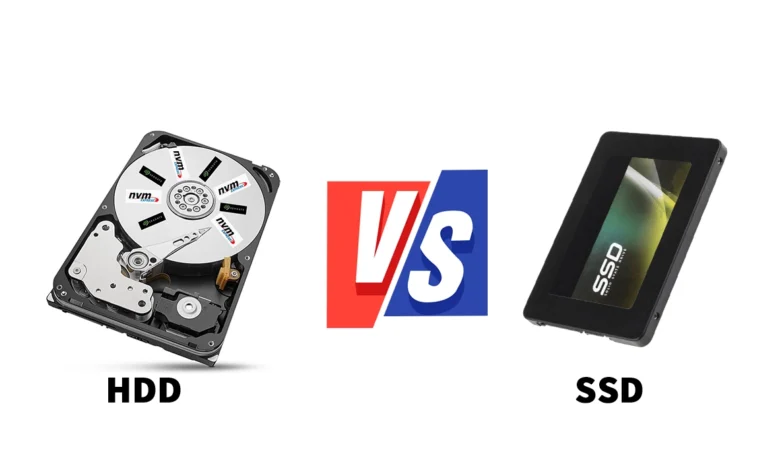
A Solid State Drive (SSD) is a storage device that uses flash memory to store data. Unlike traditional hard drives, SSDs have no moving mechanical parts.
Because SSDs can access data quickly, they are widely used in modern gaming PCs, laptops, and consoles.
Advantages of SSDs for Gaming
1. Faster Game Loading Times
One of the biggest advantages of an SSD is faster loading. Games installed on an SSD generally load levels, maps, and saved data more quickly than games installed on an HDD.
2. Faster System Startup
An SSD can help your computer start Windows and launch applications much faster. This makes the entire system feel more responsive.
3. Better Performance in Large Games
Modern games often contain large maps, detailed environments, and extensive collections of game assets. An SSD can help these games load assets more efficiently and may reduce some loading-related stuttering.
4. No Moving Parts
SSDs have no spinning disks or mechanical read heads. This makes them silent during operation and more resistant to physical shock than traditional HDDs.
5. Ideal for Modern Gaming
Many newer PC games recommend or require an SSD. Some games use technologies designed to stream assets quickly, making SSD storage particularly useful.
Disadvantages of SSDs
- SSDs usually cost more per gigabyte than HDDs.
- High-capacity SSDs can be expensive.
- Performance and durability vary depending on the SSD model and its specifications.
What Is an HDD?
A Hard Disk Drive (HDD) is a traditional storage device that uses spinning magnetic disks and a mechanical read head to read and write data.
HDDs have been used in computers for decades and remain useful for storing large amounts of data at a relatively low cost.
Advantages of HDDs for Gaming
1. More Storage for Less Money
HDDs are generally cheaper per gigabyte. If you have a large collection of games, an HDD can provide plenty of storage without requiring a large budget.
2. Useful for Older Games
Many older games run perfectly well from an HDD. If a game does not require fast storage, you may not notice a major difference in actual gameplay.
3. Good for Backups and Media
An HDD is useful for storing game recordings, screenshots, videos, documents, and backups that do not need to load instantly.
Disadvantages of HDDs
- Games generally take longer to load.
- Windows and applications start more slowly.
- Mechanical parts can produce noise and are vulnerable to physical shock.
- Some modern games may experience longer loading screens or streaming-related stutters when running from an HDD.
SSD vs HDD: Key Differences
| Feature | SSD | HDD |
|---|---|---|
| Storage technology | Flash memory | Magnetic disks |
| Game loading | Usually much faster | Usually slower |
| Windows startup | Faster | Slower |
| Gaming performance | Helps loading and asset streaming | Suitable for many older games |
| Cost per GB | Higher | Lower |
| Noise | Silent | May produce mechanical noise |
| Physical durability | Better shock resistance | More vulnerable to shock |
| Best use | Operating system and active games | Large game libraries and backups |
Does an SSD Increase FPS in Games?
This is one of the most common questions among PC gamers.
An SSD does not usually provide a significant increase in average FPS by itself. Your frame rate depends mainly on your graphics card, processor, memory, game settings, and other system factors.
However, an SSD can improve the overall gaming experience in several ways:
- Reducing loading screens.
- Helping game assets load more quickly.
- Reducing some stuttering caused by slow storage.
- Improving the responsiveness of the operating system.
If your game already runs smoothly from an HDD, upgrading to an SSD may not significantly change your average FPS. If your HDD is causing asset-streaming problems, the improvement may be more noticeable.
SATA SSD vs NVMe SSD for Gaming
Not all SSDs offer the same performance. Two popular types are SATA SSDs and NVMe SSDs.
SATA SSD
A SATA SSD uses the SATA interface and is a major upgrade over a traditional HDD in many situations. It is a good option for budget gaming PCs and older computers that support SATA storage.
NVMe SSD
An NVMe SSD uses the PCIe interface and can offer much higher sequential read and write speeds than a SATA SSD. Many modern gaming PCs use NVMe SSDs for their operating systems and games.
Although NVMe drives can be considerably faster in storage benchmarks, the difference in game loading times compared with a good SATA SSD may be relatively small in some games.
If you are building a new gaming PC, an NVMe SSD is an excellent choice when your budget and motherboard support it.
How Much Storage Do You Need for Gaming?
Your ideal storage capacity depends on the number and size of the games you play.
| Storage capacity | Best for |
|---|---|
| 256GB SSD | Basic use and a small number of games |
| 500GB SSD | Budget gaming and a modest game library |
| 1TB SSD | Most gamers who want several large games installed |
| 2TB SSD | Large game libraries and demanding modern games |
| 2TB–4TB HDD | Extra storage, older games, recordings, and backups |
Keep in mind that your operating system and applications also use storage space. A 1TB drive will not have the entire capacity available for games.
Should You Use Both an SSD and an HDD?
Yes. For many gamers, combining an SSD and an HDD is a practical and budget-friendly solution.
You can install Windows and your most frequently played games on the SSD while using the HDD for older games, media files, and backups.
For example:
- 500GB or 1TB SSD: Windows, frequently played games, and essential applications.
- 2TB HDD: Older games, recordings, screenshots, and other large files.
This setup provides fast loading for important applications while keeping the overall storage cost manageable.
If your budget allows, using a single larger SSD can also be a convenient option because all your games benefit from faster storage access.
How to Choose the Right Drive for Your Gaming PC
Before buying a storage drive, consider these factors:
1. Your Budget: Choose an SSD if speed is your priority. Consider an HDD if you need a large amount of storage at a lower cost.
2. The Games You Play: Check the storage requirements of your favorite games. Some modern titles recommend or require SSD storage.
3. Your Computer Compatibility: Verify whether your motherboard or laptop supports SATA SSDs, M.2 SATA drives, or M.2 NVMe SSDs. The M.2 form factor alone does not guarantee NVMe compatibility.
4. Storage Capacity: Consider how many games you want to keep installed at the same time.
5. Future Upgrades: If you plan to play newer games, investing in a sufficiently large SSD can be a sensible long-term choice.
Final Verdict: SSD vs HDD for Gaming
For most modern gamers, an SSD is the better choice for gaming because it provides faster loading times, a more responsive operating system, and better support for games that stream assets frequently.
An HDD remains a useful option for affordable bulk storage, backups, and older games that do not require fast storage access.
If you can afford only one drive, choose an SSD for your primary gaming system. If you need additional space for a large collection of games and media, adding an HDD later can be a cost-effective solution.
Ultimately, the best storage setup depends on your budget, available hardware, and gaming habits. A good SSD can make your PC feel faster even when it does not directly increase your average FPS.
Frequently Asked Questions (FAQs)
1. Is an SSD better than an HDD for gaming?
Yes. An SSD generally offers faster game loading and better responsiveness. However, an HDD can still work well for many older games.
2. Will an SSD increase my FPS?
Usually, not by much. An SSD mainly improves loading times and asset streaming. Your CPU and GPU have a greater impact on average FPS.
3. Can I play games on an HDD?
Yes. Many games run properly on HDDs, but some modern titles require or recommend an SSD.
4. Is a 1TB SSD enough for gaming?
A 1TB SSD is sufficient for many gamers, although the number of games you can install depends on their individual sizes and the space used by Windows and other applications.
5. Is an NVMe SSD worth it for gaming?
An NVMe SSD is an excellent choice for a new gaming PC. It offers high storage speeds, although the improvement over a good SATA SSD varies by game.
6. Can I install Windows on an SSD and games on an HDD?
Yes. This is a common setup. However, games installed on the HDD may take longer to load than games installed on the SSD.
7. Which lasts longer, an SSD or an HDD?
Both can last for years, depending on usage, quality, and operating conditions. SSDs have no moving parts, while HDDs contain mechanical components that can wear out or be damaged by physical shock.